Some days you get to the end of the evening and realize you spent eight hours in front of a screen and accomplished almost nothing. You launched agents, switched windows, re-read outputs, replied to notifications, hopped on calls. You felt busy every single minute. But when you try to list what you actually closed, the list is embarrassing. You weren’t working. You were reacting.
Then there are the other days. The ones where you’re on fire. You spin up agents, review outputs, relaunch, close tasks, open new sessions. Four, five in parallel and everything flows. At the end of the day you look at what you shipped and think: if it were always like this, what could I do with all the time I waste on the bad days?
For months I thought the difference was about energy, sleep, motivation. Then I noticed the pattern: the good days almost always fell outside working hours. Evenings, weekends. No incoming email. No Slack messages. No notifications pulling me out of the flow.
It wasn’t about energy. It was about interruptions.
Your brain is a single-core processor
If you’re a developer, you know how multi-threading works on a single-core CPU. There’s no real parallelism. There’s an illusion of simultaneity: the processor switches between threads so fast it looks like they’re running together. But at the hardware level, execution is serialized. One thread at a time.
Your brain works exactly the same way. You can spin up ten AI agents in parallel, but you can only review one at a time. Attention is serial. Nothing new so far.
The difference is that a CPU has its RAM ready. When it context switches, it saves the current thread’s state (registers, program counter, everything) and loads the next one in nanoseconds. The context is right there, in precise memory locations, ready to resume.
You don’t. When you finish a prompt and need to move to the next agent, you don’t have RAM ready. You have the void.
You know the scene. You’ve been focused for several minutes building a complex prompt. You know other agents are running, some have finished and are waiting. You hit send. And then… blank. You try to remember where you need to go next. Which conversation is more urgent. Which agent finished first. There’s a moment of disorientation. You start flipping through windows trying to find yourself. You land on a conversation that was waiting, start re-reading what it was about, right now I remember, you try to rebuild the context to write a new prompt. Meanwhile the agent you launched earlier finishes and it stresses you out, so you jump to see what it produced, give it new input, then search for the window you were in and the cycle starts over.
You’re not driving anything. You’re reacting.
”Everyone’s building frameworks to orchestrate agents. Nobody’s building a framework to orchestrate the human supervising them.”
And it gets worse the more you parallelize. Running multiple agents on the same codebase is complicated (branches, worktrees, merges, conflicts, rebases), so you naturally end up distributing the work: one agent on a repo, one on documentation for a different project, one writing tests for a feature you just closed, one analyzing the next task, another building a skill. At that point you have four or five completely different contexts open, and your brain has to context switch not just between windows, but between worlds.
The thing that took me an embarrassingly long time to see clearly is this: AI runs in parallel. Your attention is serial. You can spin up ten agents at once, but you can only review one at a time. The problem isn’t your setup. The problem is that your attention doesn’t scale with your agents.
The accidental discovery
I didn’t plan it. I didn’t read a paper and think “now I’ll implement cognitive offloading.”
I needed some pieces of paper to jot something down and remembered I had a drawer full of flashcards I used to learn new English words. I grabbed a blank one and wrote down what one of my agents was doing and which window it was in. I set it on my desk.
I wrote another one. Then another.
I lined them up. I started picking them up one at a time, first to last. When I finished reviewing an agent and gave it new input, I put the card back at the end of the line.
I started flying.
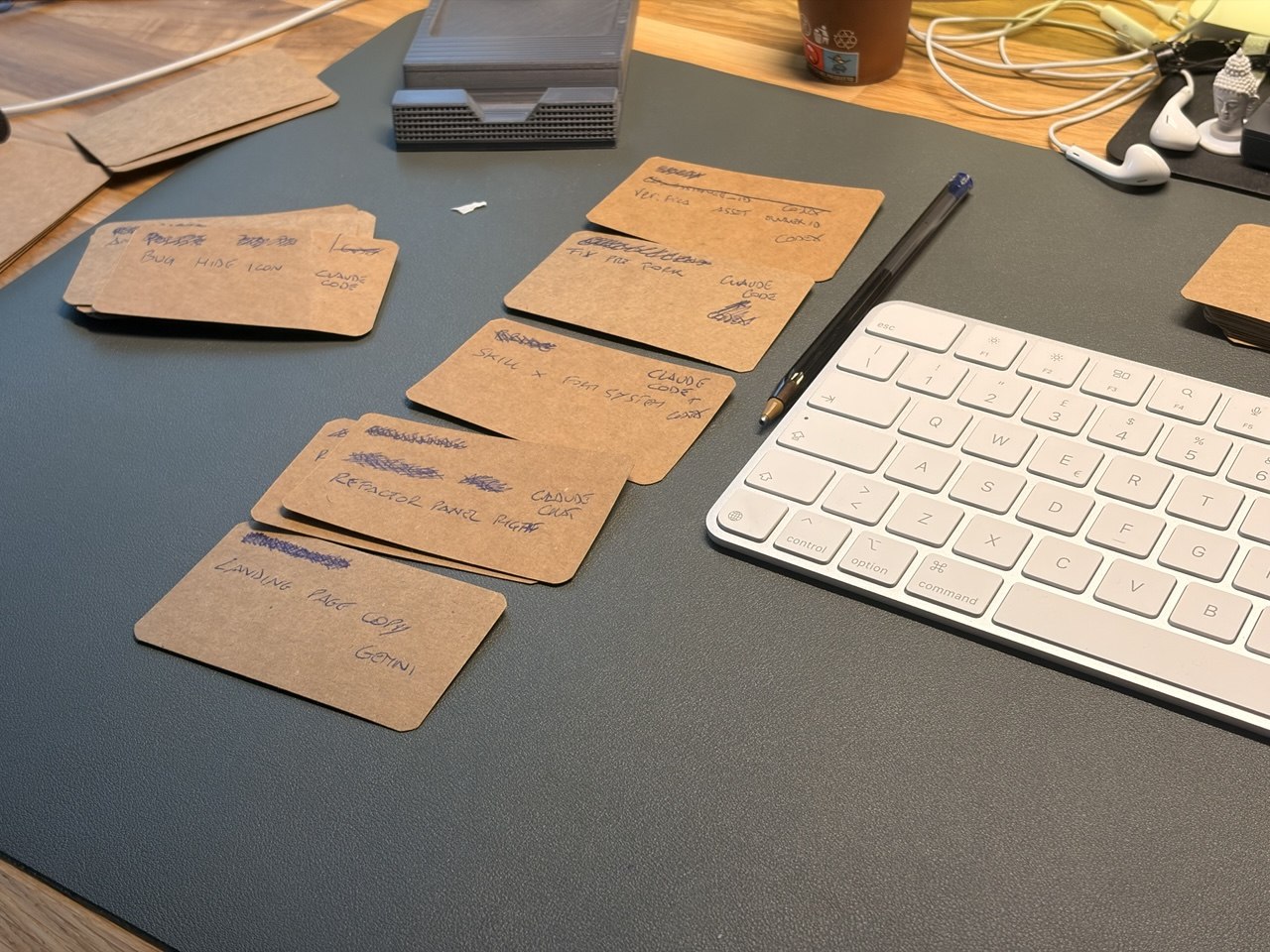
If an agent finished, I didn’t care. It had to wait its turn for my attention. If a notification came in, I ignored it. The next card in the line was the next thing I’d deal with, period. For the first time, I wasn’t chasing the agents — they were waiting for me.
The next day I replicated the setup. Same thing: the days that used to be chaotic and frustrating became fluid. The secret wasn’t the cards themselves. It was that I’d given my attention an explicit order. I’d built a FIFO queue (first in, first out), but I hadn’t put agent tasks in it. I’d put tokens in it.
”Each strip was a credit I gave the agent to buy a piece of my attention. No token, no attention. The queue decided who cashed in first.”
I called it StripFlowing.
How it works
Every time I launch an AI agent on a task, I write a strip: a card, a flashcard, a scrap of paper, whatever. I write three things on it:
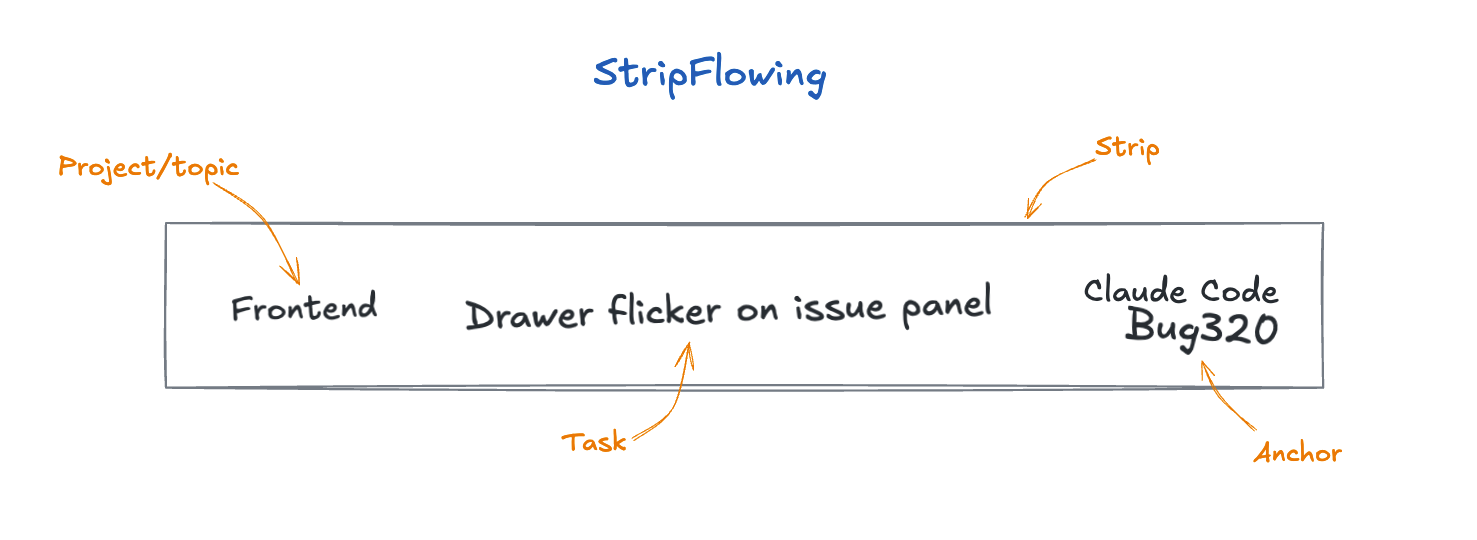
Project: which codebase or context I’m touching. Task: what the agent is doing, in one line. Anchor: the exact point I need to return to. “VSCode-Copilot — test suite auth”, “Claude Code — Fix #3554”, “Claude Chat — Analysis form”. The tool name, the conversation title or filename — whatever I need to land in the right spot without searching.
The Anchor is the detail that makes the whole thing work. The reason context switching is so expensive isn’t just the cognitive shift itself — it’s the search phase that comes before it. Where was I? Which tab? Which branch? Which conversation? It’s that moment of disorientation where you flip through windows trying to find yourself. The strip eliminates it. The strip is your context save. What the CPU has in RAM and your brain doesn’t.
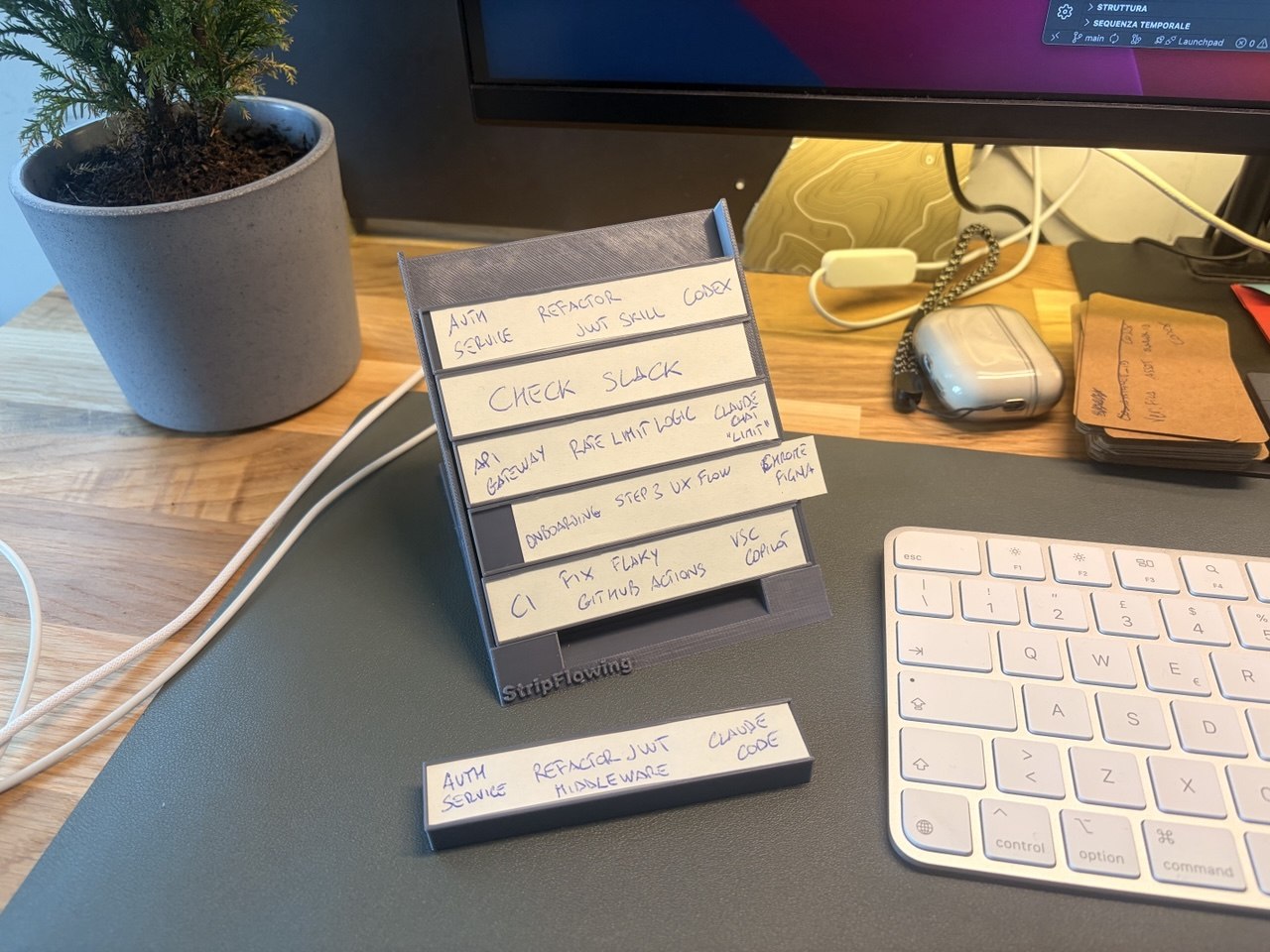
The strip goes on top of a small rack on the desk — the bay. It sits there, off-screen, tangible, always visible, clear. It can’t disappear like a closed tab or an ignored notification.
The rules:
You always work from the bottom strip only — the oldest one, first in first out. Even if another agent just finished, even if a notification comes in, the next strip in the queue is the next thing you do. No exceptions.
After review, the strip goes back on top. You reviewed the output, gave the agent new input? The strip goes back to the top of the stack. Over time it’ll sink back down toward the bottom, waiting for its turn.
When the strip is done, it leaves the bay. Task closed, strip tossed. The slot opens up.
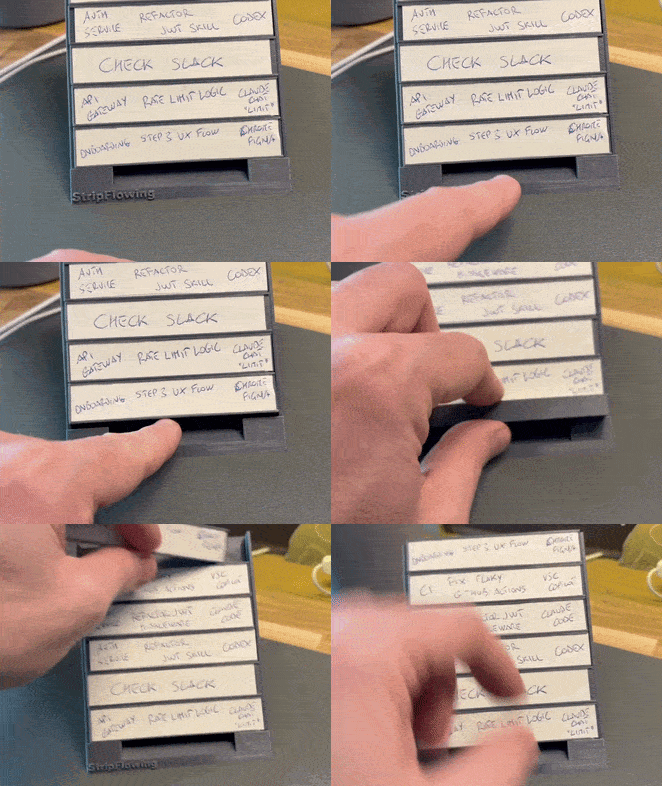
That’s the entire method. Three fields on a card. A FIFO queue. The constraint of one strip at a time.
The freeze
One of the things I discovered by accident is that StripFlowing doesn’t just manage sessions — it manages transitions.
One day I broke for lunch. Three agents were still running, two strips were waiting for review on the bay. When I came back to my desk, I didn’t have to reopen tabs, re-read conversations, or reconstruct the mental context. I picked up the strip from the bottom, looked at the Anchor, and in thirty seconds I was back in.
From there I realized the strips also work as a freeze frame of the entire work session. I started archiving decks by context: work strips on one side, side projects on the other. When I switch modes, I swap the deck and the bay is ready. The context is there, frozen, ready to pick back up. No “where was I,” no twenty-minute warmup.
Even at the end of the day, with the strips on the desk, it feels different. You’re not abandoning things mid-stream. You’re pausing an ordered system that tomorrow will restart from the exact point where you left it. It’s a feeling I’ve never had closing a laptop with twenty tabs open.
Why it works
After using the method for a while, I started looking into whether it had any basis beyond my own experience. What I found is a surprising parallel with a world that has nothing to do with software.
Air traffic controllers have been managing dozens of aircraft in parallel for decades using Flight Progress Strips: paper strips slotted into a physical rack. Each strip is one aircraft: callsign, route, altitude, constraints. They have incredibly sophisticated radar, and yet the physical strips remain a core tool. Wendy Mackay’s research at Aarhus University studied why: the physical rack keeps information always present without requiring active attention, the gesture of moving a strip reduces cognitive load, and the spatial layout communicates priority and sequence without mental processing. Electronic systems that tried to replace the strips often made controllers’ situational awareness worse.
Theirs is called Air Traffic Control. Mine is Attention Traffic Control.
I want to be honest: StripFlowing isn’t scientifically validated. I haven’t run a controlled study. I’ve had a few colleagues try it and none of them went back, and the reason it works, I believe, is that it rests on well-established principles.
Cognitive offloading is the use of physical actions to reduce the information-processing demands of a task (Risko & Gilbert, 2016). In practice, it’s a brain dump: you pull out of your head everything that doesn’t need to stay in there and put it on a physical support. Writing on the strip and placing it in the bay is exactly that brain dump. You’re saving state outside your head so your head can focus on one thing.
Attention residue: Sophie Leroy showed in 2009 that when you switch from Task A to Task B without an explicit plan for resuming A, part of your attention stays glued to A. The strip is that explicit plan. Leroy calls it a “Ready-to-Resume Plan”: writing down where you are and what you’ll do next lets the brain release the current task without dragging it along. Every StripFlowing strip is a Ready-to-Resume Plan condensed into three fields.
A study from the University of Tokyo (Umejima et al., 2021) found that users who wrote on physical paper completed cognitive tasks 25% faster than those using digital equivalents, with significantly higher hippocampal activation. Writing on a physical object forces the brain to build a stronger neural connection with the information.
And then there’s the working memory data: the real limit is around four simultaneous items (Cowan, 2001), not Miller’s “seven plus or minus two,” which has been widely misunderstood. This isn’t an argument for capping your strips at four — it’s the argument for why you need the strips. If your brain holds four things at once and you have six agents open, the extra two don’t get “managed worse.” They get lost. The strips are the external memory that compensates for that limit.
It scales more than I expected
The bay I built has six slots. I designed it thinking that was a high ceiling, that beyond six tasks the method would start to crack.
I was wrong. I found myself adding strips well past six slots and the work stayed manageable. The frequency at which each strip comes back into your hands gets longer (it takes more time for a strip to make a full trip through the queue), but the order holds. You don’t feel the weight of having twelve things in flight because at any given moment you’re looking at one. The rest waits, neatly, in the rack.
What protects you isn’t the number of slots. It’s the protocol: one strip at a time, always from the bottom, no exceptions for the loudest notification.
I’d love to hear how it works for you. How many strips are you running? Is it useful? Does it feel better?
Things I’ve discovered using it
Tasks you procrastinate. Those things you’ve been putting off for weeks become a strip among many. You don’t have to tackle them in a heroic block — you just respond when the strip reaches the bottom of the queue. Round after round, they move forward.
Email, Slack, and interruptions as strips. Even “check email” or “reply to Slack messages” can become a strip in the bay. Instead of jumping on it the second a notification lands, the strip waits its turn. Interruptions become ordered tasks.
Morning backlog. I prep my strips at the start of the day, before launching any agent. Writing down the tasks I plan to delegate forces me to think about them first, to set priorities before the chaos begins.
Cocking. Borrowed from air traffic control. If a strip is shifted sideways in the rack, it means something. What that something means is up to you.
Iterative annotations. With each pass you can add details to the strip: a status change, the iteration count, a note. The strip becomes a small physical log of the task that grows richer over time.
Try it
Cut up some cardstock, write Project, Task, and Anchor for the runs you have going, stack them on your desk, and work them one at a time from the bottom. That’s the method.
You can download a printable PDF template for the strips here: StripFlowing Cut Template (PDF)
If it works and you want something sturdier, on MakerWorld I’ve published two 3D-printable models: the StripFlowing Desk, a tilted desktop rack, and the StripFlowing Portable, for working on the move or from the couch: 3d models
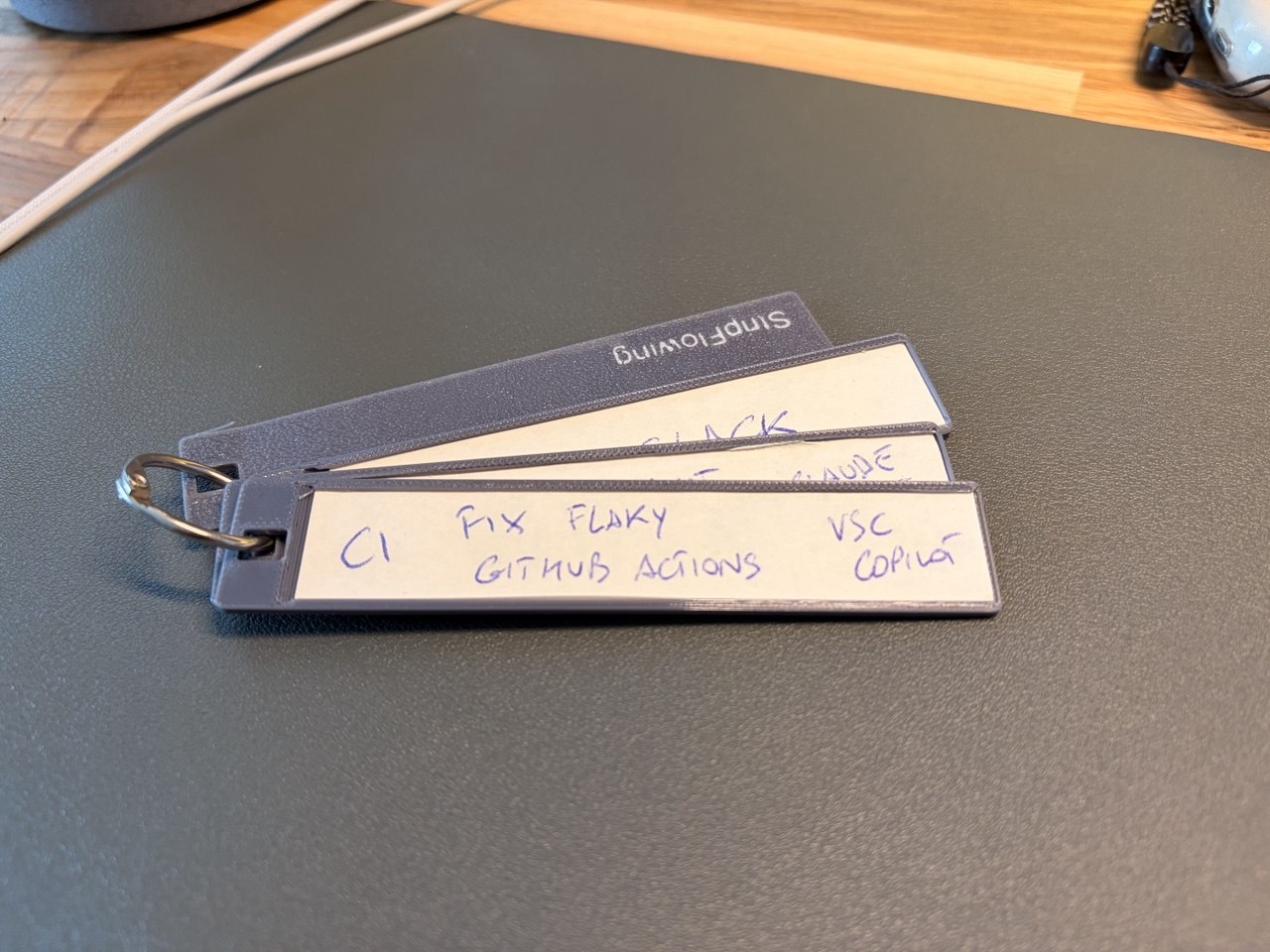
The entire method is open. If you build a setup, adapt the protocol, or find where it breaks for you, I want to hear about it.
We’ve learned to orchestrate machines. Now it’s time to learn to orchestrate ourselves.